ShieldScan: quick, client-side security audits for government sites
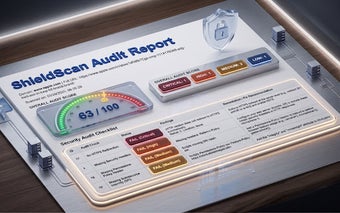
ShieldScan, developed by Dharambir Singh, is a Chrome extension built to run automated security audits on government and public websites. It executes client-side checks that surface critical vulnerabilities and gives near real-time results, focusing on headers, cookies, DOM issues and exposed files. The add-on targets security officers, IT administrators and compliance auditors who need fast, low-overhead assessments that fit public-sector audit workflows.
What is ShieldScan used for?
ShieldScan is positioned as a specialist auditing tool for public-sector web properties, designed to deliver quick diagnostic results rather than replace full penetration testing. The extension performs over 20 automated checks on the client side and includes specific routines for security headers, cookie settings, DOM vulnerabilities and exposed files. Its aim is to give teams a focused checklist that maps to compliance needs for government sites.
How quickly does it run scans and what is the resource impact?
The developer optimizes the extension for speed: routine scans report findings in under five minutes and provide immediate feedback while a page is open. Because checks execute in the browser, scans avoid network round-trips to external services, which helps keep run time low. The tool is described as lightweight, so deployment across many machines is feasible for scheduled spot checks.
Does ShieldScan limit data collection and respect privacy?
The extension follows a privacy-first design and the developer states that it does not collect or use user data, an explicit policy that suits regulated environments. ShieldScan runs its analysis client-side, which reduces the need to transmit page contents to third parties. The developer is registered for trade compliance in the EU, a fact that supports the claimed focus on minimal telemetry and legal compliance.
Is ShieldScan appropriate for public-sector teams and what are the trade-offs?
Security officers, compliance auditors and public web developers are the intended users, and the extension’s narrow focus reflects that audience. A practical trade-off is platform scope: it works on Chrome and other Chromium-based browsers only, and its client-side orientation means deep server configuration or authenticated backend testing is outside its remit. Teams should treat it as a rapid assessment step within a broader audit program.
Best used as a fast compliance tool, not a replacement for deep testing
ShieldScan is a practical choice for public-sector teams that need repeatable, low-friction audits integrated into browser workflows. Use it to catch obvious misconfigurations quickly and to prioritize follow-up work. For thorough security assurance, pair ShieldScan’s client-side findings with scheduled server-side testing from dedicated scanning platforms or penetration testers.